Before Filing Season: A Security Training Plan for Tax Firm Staff (2026)
Security training for tax preparers often happens once a year, for the people who were already on staff. Then January arrives and the firm adds seasonal preparers and front desk help. The newest people get access to client files before anyone walks them through the security plan. That gap is where a lot of trouble starts.
Last Updated: November 2026
Consider what happened at a CPA firm in Santa Cruz, California. On March 11, 2026, the firm discovered that someone had gotten into an employee’s Microsoft Outlook account the day before. The intruder began sending phishing emails to some of the firm’s clients. According to the firm’s notice filed with the Massachusetts Attorney General, the tax return and file storage systems were never touched. The inbox was enough. It held dates of birth, Social Security numbers, financial account information, and driver’s license numbers. The notice letter is dated September 28, 2026, more than six months after discovery.
Timing matters too. A CPA firm in Knoxville, Tennessee reported in its breach notice that an unauthorized actor was in its network from January 13 to 21, 2026. That is the opening stretch of filing season, when every firm is busiest and least likely to pause over an odd email.
This guide covers what the rules say about staff training and why seasonal hires are the biggest gap. It also lays out what to train on and a six-week plan you can finish before the first return comes in.
What the Rules Say About Security Training for Tax Preparers
Start with the federal baseline. The FTC Safeguards Rule lists “an accountant or other tax preparation service that is in the business of completing income tax returns” as an example of a financial institution (16 CFR 314.2). Covered firms must keep a written information security program. One required element, section 314.4(e), calls for “security awareness training that is updated as necessary.”
The FTC’s own business guidance puts it plainly: a program “is only as effective as its least vigilant staff member.” It tells firms to provide security awareness training and to schedule regular refreshers.
Small firms often assume an exemption covers them. The rule does exempt firms that hold customer information on fewer than 5,000 consumers from four requirements. Those are the written risk assessment, continuous monitoring or periodic testing, the written incident response plan, and the annual report to the board (16 CFR 314.6). However, security training for tax preparers is not on that list. As a result, a two-preparer office with 800 clients still owes its people training.
What IRS Publication 5708 Adds
The IRS guidance gets more specific. IRS Publication 5708 (revised August 2024) is the Security Summit’s guide to writing a security plan. Its sample plan includes these expectations:
- An annual training session for owners, managers, employees, and independent contractors, including temporary and contract employees who have access to client data.
- Training for all new employees before they get access to personal information.
- A signed acknowledgment from each person, refreshed at annual training and kept on file.
- Disabling logins and passwords for departing employees at the time they leave.
A quick caveat. Whether and how these rules apply depends on your firm’s activities, your state, and any contracts you have signed. Publication 5708 itself says there is no one-size-fits-all plan and that a sole practitioner can use a simpler one than a 10-partner firm. Confirm your obligations with your own advisor. What follows is a practical way to do the training part well.
Why Seasonal Staff Are the Biggest Training Gap
Many firms run security training for tax preparers in the summer or fall, often around continuing education or the IRS Nationwide Tax Forums. The full-time team gets the session. Then seasonal hires start in January, and nobody repeats it.
Publication 5708 flags this directly. Its sample acknowledgment form notes that clear security rules matter most “when you hire new or temporary employees.” Seasonal staff are new to your systems, new to your clients, and under pressure to move fast. They also don’t know what normal looks like. For example, a long-time admin knows that Mrs. Patel never emails attachments. A seasonal preparer in week two has no idea.
In addition, seasonal hiring creates an offboarding problem. Temporary staff leave after April or after the October extension deadline. If their email and software logins stay active, the firm carries open doors into the next season. Publication 5708 treats closing access as seriously as granting it.
The fix is a gate. No one touches client data until they finish training and sign the acknowledgment. That applies to the owner’s nephew helping at the front desk just as much as to a credentialed preparer.
What to Train Your Team On: Five Scenarios That Hit Tax Offices
Generic phishing slides don’t stick. Instead, train on the scenarios your staff will actually face between January and April. The IRS has named most of them already.
1. The “new client” email
In its 2026 Dirty Dozen list (IR-2026-30), the IRS warned that tax professionals remain targets of “new client” or “document request” emails that deliver malicious links or attachments. A prospective client asks for help and attaches “last year’s return.” The attachment is the attack. Teach staff to route new client intake through your portal or a phone call, never through an unexpected attachment.
2. The trusted sender who isn’t
This one catches experienced people. For instance, the same IRS release notes that scammers who break into a taxpayer’s email can find genuine messages that person previously sent to their tax professional. The next email looks exactly like the real client, because it came from the real client’s account. The lesson for staff: a familiar name is not proof. Unusual requests, like a new bank account for a refund or an urgent document, get verified by phone at a number already on file.
3. The text or phone call
Meanwhile, attackers have moved beyond email. Verizon’s 2026 Data Breach Investigations Report found that mobile-centric attacks by voice and text succeeded at a rate about 40% higher than email phishing. A call from “the IRS,” your software vendor, or “IT support” follows the same rule. Hang up and call back on a known number.
4. The payment change request
Business email compromise is a money crime as much as a data crime. The FBI’s 2025 Internet Crime Report recorded 24,768 business email compromise complaints and $3,046,598,558 in reported losses. For a tax firm, that looks like a “client” asking to redirect a refund or a “vendor” sending new wire instructions. Set a firm rule that no payment detail changes without a verbal check, and teach every staff member the rule.
5. The moment after someone clicks
This is the scenario most training skips, and the one that matters most. At the Santa Cruz firm, the intruder used the hijacked account to phish the firm’s own clients. The faster an employee reports a mistake, the faster the firm can lock the account and warn clients. Make reporting fast and blame-free. Tell staff exactly who to tell and how: a call or text, not an email from the account in question. Make clear that reporting a click will never get them in trouble. Training that makes people afraid to admit a click works against you.
Security Training for Tax Preparers: A Six-Week Plan
You have roughly ten weeks before filing season opens in late January. Here is a plan that fits in six, with room to spare for holidays.
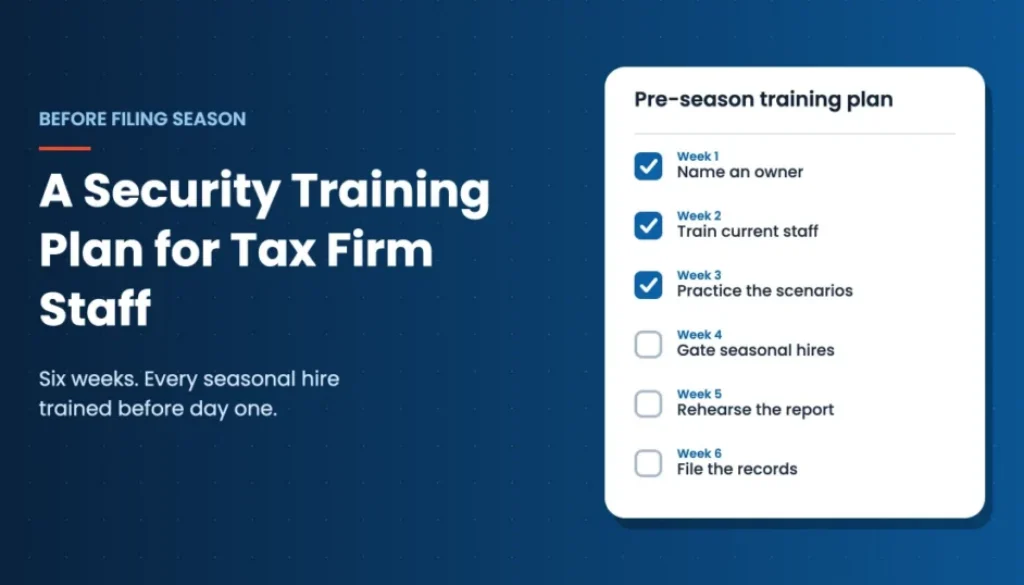
Week 1: Name an owner and list who has access
Pick one person to own training. The Safeguards Rule already requires a Qualified Individual to oversee your program, and Publication 5708 uses the title Data Security Coordinator. Then list everyone who will touch client data this season. Include partners, staff, seasonal hires, contractors, and family members who help out.
Week 2: Run the core session for current staff
Hold a 45 to 60 minute session covering your written plan, how client data should move (portal, not email attachments), and the five scenarios above. Have each person sign the acknowledgment form. Record the date, topics, and attendees.
Week 3: Practice the scenarios
Walk through each scenario as a short exercise. Show a sample “new client” email and ask what to do. Role-play a call from someone claiming to be your software vendor. Use real examples from IRS releases. Ten minutes per scenario is enough.
Week 4: Build the onboarding gate for seasonal hires
Package the core session into a short onboarding module that every new hire completes before their logins are activated. Include the acknowledgment form, the reporting instructions, and the payment verification rule. Decide now who signs off that the gate was met.
Week 5: Rehearse the report and the response
Run a 20 minute drill. Someone “clicked.” Then walk through it: who do they call, and who locks the account? Next, decide who judges whether clients need a warning. Finally, name who contacts your IRS Stakeholder Liaison, as the IRS advises for data theft. Our tax firm data breach response plan covers the full call order.
Week 6: File the records and set the offboarding date
Gather signed acknowledgments, attendance records, and session notes in one place. Put a calendar reminder on the date each seasonal hire leaves, so their access gets shut off that day. Schedule a short refresher for mid-February, when fatigue sets in and attention slips.
What Records to Keep
Training you can’t show is training a client, insurer, or regulator may treat as missing. Keep a simple file for each season:
- The date, length, and topics of each training session.
- A signed acknowledgment for every person with access, including seasonal and contract staff.
- Confirmation that each new hire finished training before getting access.
- The dates access was granted and removed for temporary staff.
- Notes on any reported incidents and how they were handled.
These records serve two purposes. They show that your program exists in practice, not just on paper. They also give you a starting point if something does go wrong, because you will know who was trained, on what, and when.
Frequently Asked Questions
Do small tax firms have to train their staff on security?
The FTC Safeguards Rule names tax preparation services as financial institutions and requires security awareness training as part of a written information security program. The exemption for firms with fewer than 5,000 consumers does not remove the training requirement. Applicability depends on your firm’s activities, so confirm with your advisor.
How often should a tax firm hold security training?
IRS Publication 5708 describes an annual training session for everyone with access to client data, with periodic refreshers. Many firms add a short session right before filing season, plus onboarding training for each new hire.
Do seasonal and temporary employees need security training?
Yes. Publication 5708’s sample plan specifically includes temporary and contract employees who have access to client data, and it says new employees should be trained before they get access to personal information.
What should security training for tax preparers cover?
Cover your written security plan and how client data should be shared. Then train on the scams the IRS warns about: new client and document request emails, hijacked client accounts, phone and text impersonation, and payment change requests. Finish with how to report a mistake quickly.
What records should a tax firm keep to show training happened?
Keep session dates and topics, signed acknowledgments for every person with access, proof that new hires trained before getting access, and the dates temporary staff access was granted and removed.
What should an employee do after clicking a suspicious link?
Report it right away to the person your firm has named, by phone or text rather than from the affected email account. The firm can then secure the account, check for misuse, and decide on next steps, including contacting its IRS Stakeholder Liaison if client data may have been stolen.
Make Security Training for Tax Preparers a Routine
Your firm already has the obligation to train its people and the pressure of a filing season that starts in a few weeks. defend-id helps small firms turn that into a routine. Assign employee security training and keep the records in one place next to your policies. If someone clicks the wrong thing, 24/7 incident response and breach support is ready. You still own your program. We help you run it. See how defend-id works for tax and accounting firms.
Related Articles
- Tax Firm Data Breach Response Plan: Who Calls Whom Before Filing Season
- Your IT Company Fixes the Systems. Who Handles the Breach?
- Your Tax Firm Is the Target: What the IRS’s Summer Security Campaign Means for Small Practices
- Cybersecurity Awareness Month 2026: A Four-Week Plan for Firms Without a Security Team